
How to Add Your BookBuzzr Widget to Your Website or Blog?

We often get this question from some authors who want to know how they can add the BookBuzzr Book Widget to their blog or website. Here are the steps you need to follow:

  1. Go to your book-widget. This is usually found on your Book Marketing Home Page or on your book-detail page on the  Freado.com website.
  2. Click on the “Share” button.
  3. You will see a line that says “Embed Code” with some code beside it and a button that says “Copy”. Click on “Copy”.
  4. Then go to your web-page and “Paste” the code inside the HTML file(index page/home page).

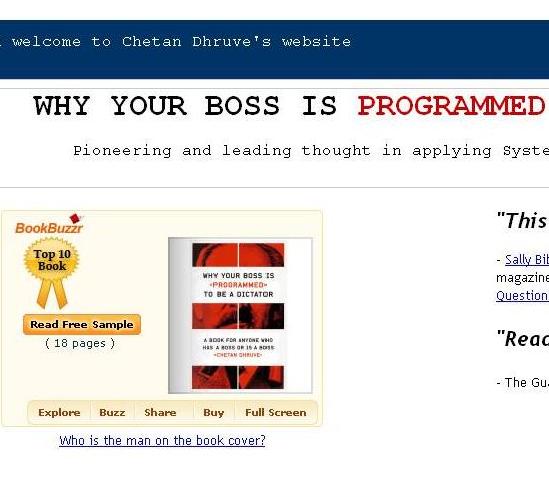
Once you add in your widget to your blog, it will look like this:
You can leave a response, or trackback from your own site.

16 Responses to “How to Add Your BookBuzzr Widget to Your Website or Blog?”

  1. How can I put the bookbuzzr widget on Facebook and LnkedIn? Is there a place on those sites where one may paste the code? Thanks :-)

    Like or Dislike: Thumb up 1 Thumb down 0

  2. Ranga Ranga says:

    Please check the link http://www.bookbuzzr.com/blog/book-marketing/how-to-market-your-book-by-sharing-your-bookbuzzr-book-widget-on-facebook/ to know how to share the widget on Facebook. But it is not possible to share the BookBuzzr widget on LinkedIn.

    Like or Dislike: Thumb up 1 Thumb down 0

  3. Ross Cossins says:

    Your instructions for installing a BookBuzzr widget defaults to Facebook Profile pages, but not Facebook Pages. Any ideas how or if this can be done?

    Regards,

    Ross Cossins

    Like or Dislike: Thumb up 0 Thumb down 0

  4. id powers says:

    hello,

    I am trying to use the book widget on a joomla website. the “mini” loads without any problems, the larger one shows a blank “spot” on the page, ? do you have any ideas where or what I can alter to make it show up?

    Like or Dislike: Thumb up 0 Thumb down 0

  5. I love the idea of the book widget, but when I try to add it to the widgets on my wordpress site (tonymcfadden.wordpress.com) it fails to a URL. Any ideas?

    Like or Dislike: Thumb up 0 Thumb down 0

  6. …I posted too fast. mini-widget works just fine…

    Like or Dislike: Thumb up 0 Thumb down 0

  7. Hi, Ranga… I’m still having a problem. I follow all instructions,but when I paste to any other site, only the code appears. If it is something I must look for within my computer setup, could you advise me please?

    Like or Dislike: Thumb up 0 Thumb down 0

  8. Ranga Ranga says:

    Mary Maclaren,

    I am sorry to know that you are still having trouble with the widget. I noticed that the original code which has HTML tags has been modified to HTML code in your website.

    FYI … the widget code shared on this blog looks as under:

    But when we checked the ‘View Page Source’ in your website the code has been modified to the below code:

    <code><img style="visibility:hidden;width:0px;height:0px;" border=0 width=0 height=0 src="http://counters.gigya.com/wildfire/IMP/CXNID=2000002.0NXC/bT*xJmx*PTEyOTAwNzg2MTEzNDMmcHQ9MTI5MDA3ODYxMzQyMSZwPTU*OTI4MiZkPSZnPTImbz*1Mjc1NWFlNzBlNmI*YTZlODhk/OWNhNDdkZjE5YWI3YSZvZj*w.gif" /><object id=’bookwidget’ name=’bookwidget’ width=’328′ height=’220′><param name=’book’ value=’http://www.freado.com/bookwidget.swf’ ></param> <param name =’flashVars’ Value=’document_Id=9782_27803_1′></param><param name=’allowScriptAccess’ value=’always’></param><param name=’allowFullScreen’ value=’true’></param><param name=’allownetworking’ value=’all’></param><embed src=’http://www.freado.com/9782/widget’ type=’application/x-shockwave-flash’ allowfullscreen=’true’ width=’328′ height=’220′ FlashVars="document_Id=9782_27803_1"></embed></object></code>

    It could be like your website does not support the HTML tags or you need to edit the code and update it or if available use the HTML version of the editor.

    Another option you can try to put up the BookBuzzr Mini Widget in your website. FYI … the Mini widget for your book is as under:

    www.bookbuzzr.com

    Like or Dislike: Thumb up 1 Thumb down 0

  9. Sharelord says:

    I love the idea of the book widget, but when I try to add it to the widgets on my word press site but it is not work.

    Like or Dislike: Thumb up 0 Thumb down 0

  10. Ranga Ranga says:

    Hi Ricky,

    You are right about it. BookBuzzr widget does not work for blogs running on WordPress. BookBuzzr Mini-widget works just fine on WordPress. Mini Widget goes where the BookBuzzr Book Widget does not go. Like on your WordPress.com blog or on a narrow sidebar. BookBuzzr Mini Widget is light, fast and smaller than the BookBuzzr widget.

    To get the mini-widget in the side bar of wordpress blog please follow the instructions below.

    1. Log In to the wordpress blog.
    2. You will be directed to the Dashboard.
    3. On the left hand side you can see the ‘Appearance’. Click on this.
    4. You can see various options under this.
    5. You can see the ‘Widgets’ option. Click on this option.
    6. You get to see the ‘Available Widgets’ / ‘Inactive widgets’.
    7. Drag and drop the widget named ‘Text’ for arbitrary text or HTML into the sidebar.
    8. Click on the ‘Text’ widget. You can see an empty box and a title bar.
    9. Paste the mini-widget code into the empty box and give some title in the title bar.
    10. Click on the save option.
    11. Next check your blog/site. You can see the mini-widget in the sidebar.

    Regards,

    Ranga

    Like or Dislike: Thumb up 0 Thumb down 0

  11. Michelle says:

    How do I get the widget on my blog which is on blogspot?

    Thanks!

    Like or Dislike: Thumb up 0 Thumb down 0

  12. Ranga Ranga says:

    Hi Michelle,

    Thank you for your query. Adding the widget to your blog is easy. Click on the “Share” button in the BookBuzzr widget. There you will see a line of code with the text “Embed code” beside it. Click on the “Copy” button. Then paste this code into the “EDIT HTML” area under ‘New Post’ on your blog. Please check the link http://sanojmn.blogspot.com/ to view your widget in our test blogger account.

    Like or Dislike: Thumb up 0 Thumb down 0

  13. DC Gallin says:

    Hi Ranga, is it possible for people to download and pass on the taster to their friends? in other words make the widget go viral? Any idea on how to do it??

    Like or Dislike: Thumb up 0 Thumb down 0

  14. Ranga Ranga says:

    Hi DC Gallin,

    Thank you for your query. Here are the three different ways to make the BookBuzzr widget go viral.

    1. Click on the “Share” option in the widget. You will see a line that says “Embed Code” with some code beside it and a button that says “Copy”. Click on “Copy”. Then go to your web-page or blog and “Paste” the code inside the HTML file (one good option is to replace the book-picture on your website or blog with the BookBuzzr widget). Visitors to your site or blog will be able to read your book-extract right there itself!
    2. Click on the ‘Share’ button in the widget. Upon clicking the Share button, you will see a variety of buttons to share your book. Click on the “B” button at the top to share the widget on the blogger. A window should open with a message asking you to enter the login details. Check the option ‘Post to sidebar’ and click on Post. Your widget should appear in the sidebar of your blog.
    3. Be the first of your friends on Facebook to like the widget by clicking on the like button in Freado’s book profile.

    If you have any other queries you can mail me at ranga@freado.com

    Regards,

    Ranga
    Author Success Manager
    BookBuzzr Book Marketing Technologies Pvt. Ltd.
    http://www.bookbuzzr.com
    http://www.freado.com

    Like or Dislike: Thumb up 0 Thumb down 0

  15. [...] Flipper Widget – a technology that grabs that attention of visitors to your blog or Facebook [...]

    Like or Dislike: Thumb up 0 Thumb down 0

Leave a Reply

Powered by WordPress | Find Wireless Deals at BestInCellPhones.com. | Thanks to iCellPhoneDeals.com Free Cell Phones, Find Highest CD Rates and Incinerador De Grasa Revisión